Order execution
Place orders, cancel pending orders, close positions, or flatten your exposure.
Most traders analyse in one place, execute in another, practise somewhere else again and measure results in a fourth. Timeless Charts keeps all three on one workspace: the same bars, the same drawings, the same trade panel — live, in replay, and in the report that follows.
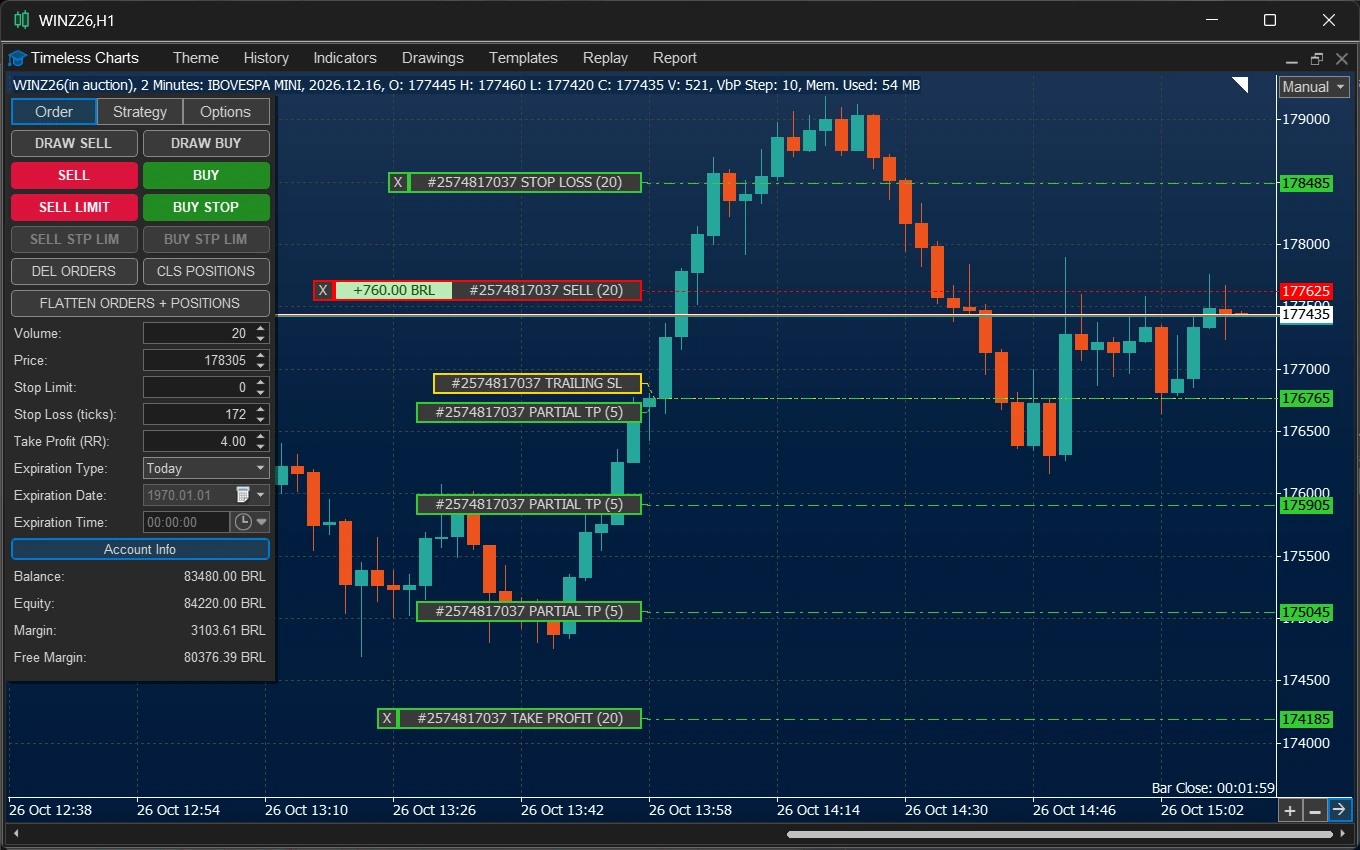
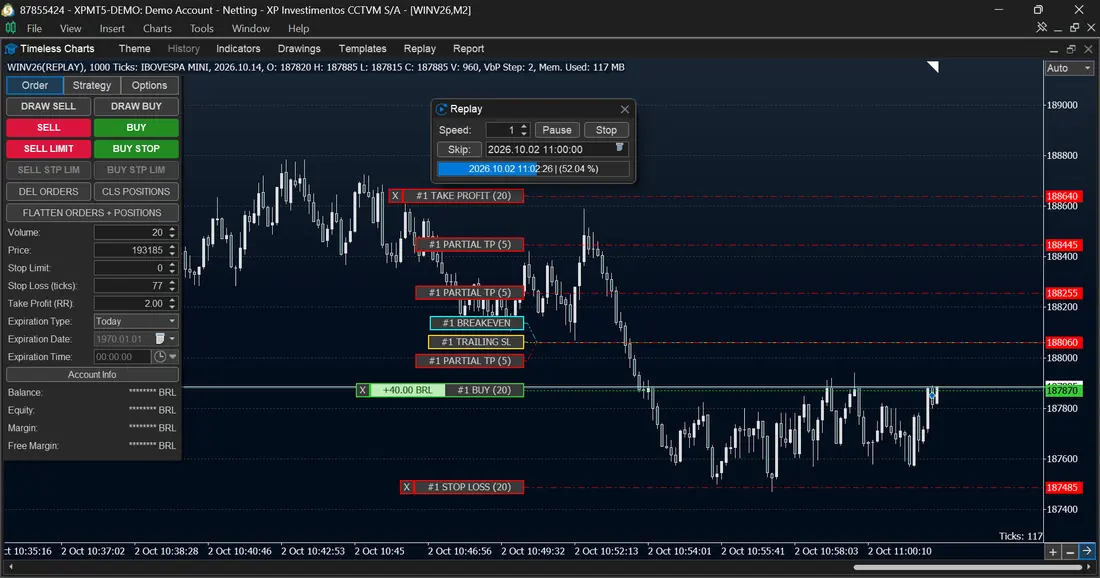
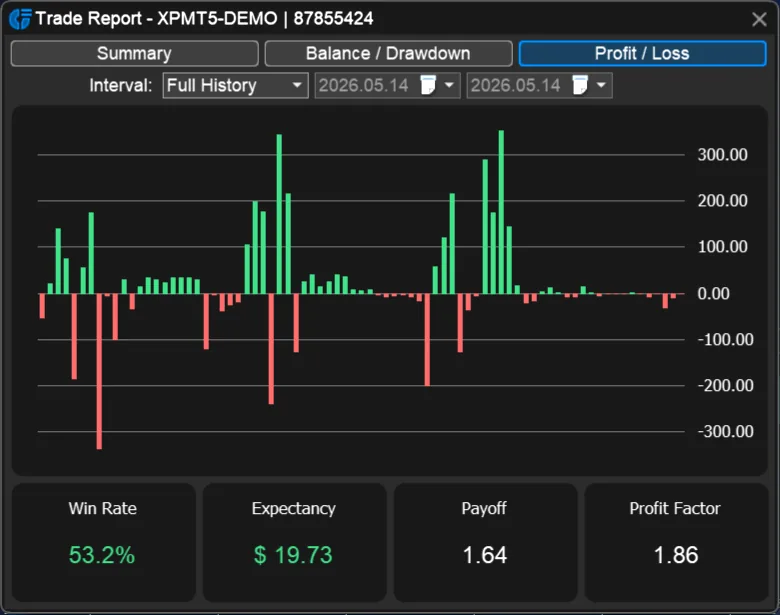
Trading is a continuous process. Test a setup, evaluate how it behaves, execute it, and review the results against your expectations. What you learn from each stage helps you refine your trading model and prepare for the next cycle.
Practice your trading ideas with Market Replay and live simulation. Analyze market conditions, evaluate your trading decisions, and determine whether your approach is worth pursuing.
Apply the plan on your charts, with the same analysis tools and trade panel used to prepare and manage the setup.
Compare performance with your expectations, identify what needs adjustment, and carry those findings into the next test.
Manage the trading workflow from a dedicated panel integrated with Timeless Charts' custom charts. Place and manage orders, control open positions directly on the chart, configure semi-automated trade management, and define account-level rules to limit exposure.
From visual trade planning to position management and automatic flattening, execution and risk controls stay close to the chart you are working with.
Place orders, cancel pending orders, close positions, or flatten your exposure.
Adjust order and position levels visually, with profit and loss displayed alongside them.
Configure breakeven, trailing stops and partial take profits for new orders.
Automatically flatten exposure when profit, loss or time conditions are met.
Place market and pending orders from the trade panel, or use the on-chart risk-reward tool to plan your entry, stop loss and take profit visually before submitting an order.
Manage working orders and open positions directly on the chart. Adjust their price levels, monitor position P&L alongside the trade levels, cancel orders, close positions, or flatten your exposure using the trading controls.
For a faster workflow, press Shift for a buy setup or Ctrl for a sell setup. The configured trade levels appear on the chart; click at the desired price to place a pending order there using your configured order parameters.
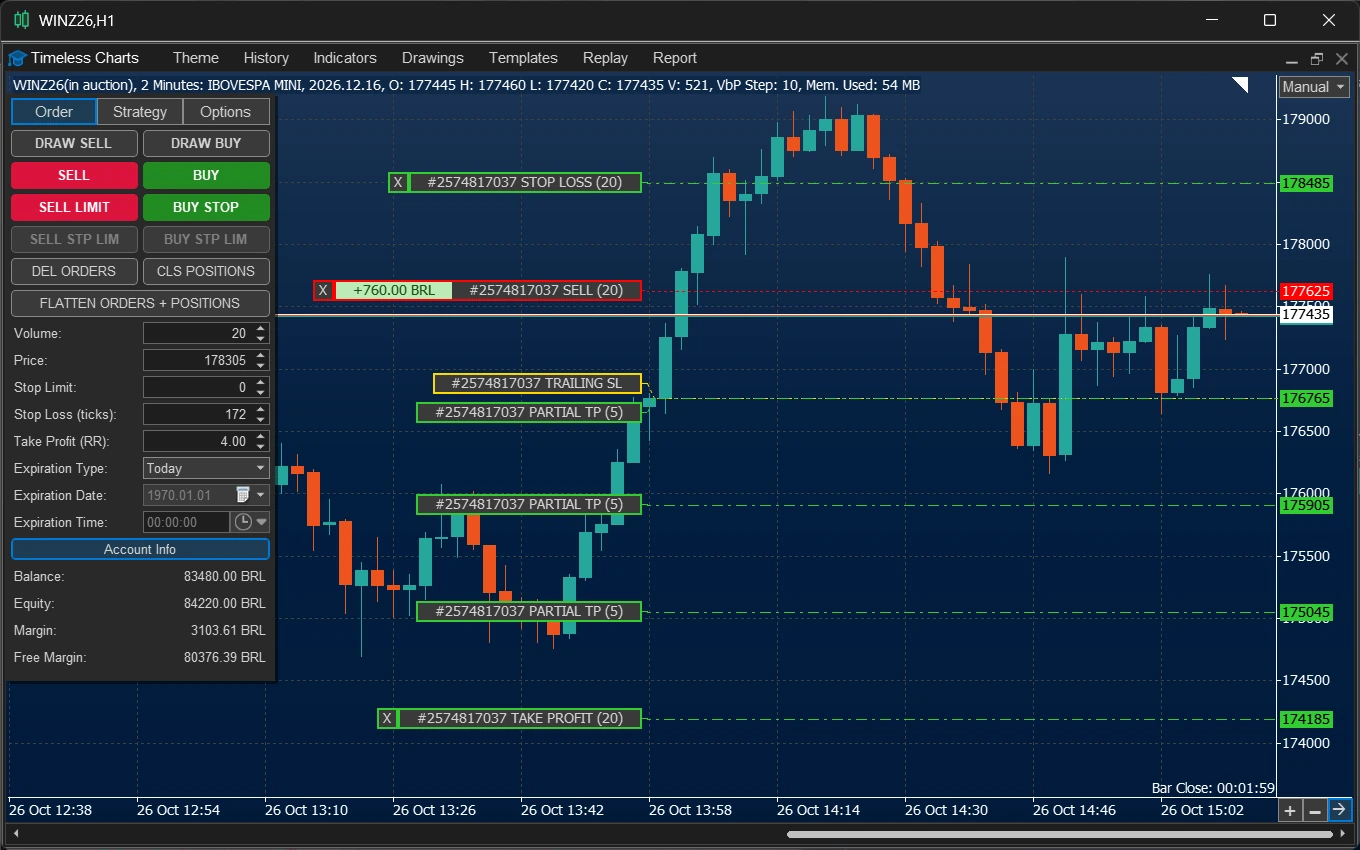
Set the order volume yourself or calculate it automatically from your stop-loss distance and risk limit. Timeless Charts supports three position-sizing methods, so you can choose the one that fits your trading plan.
Specify the lot size directly for each order.
Calculate the lot size from a specified cash risk and stop-loss distance.
Calculate the lot size using a fixed percentage of account balance and the stop-loss distance.
Configure breakeven, trailing-stop and partial take-profit rules in the Strategy tab of the trade panel. These settings define how positions can be managed after entry and can be prepared before placing a trade.
When a position is open, its management levels can be displayed on the chart and adjusted by dragging them. This combines predefined trade-management rules with direct visual control as the market moves.
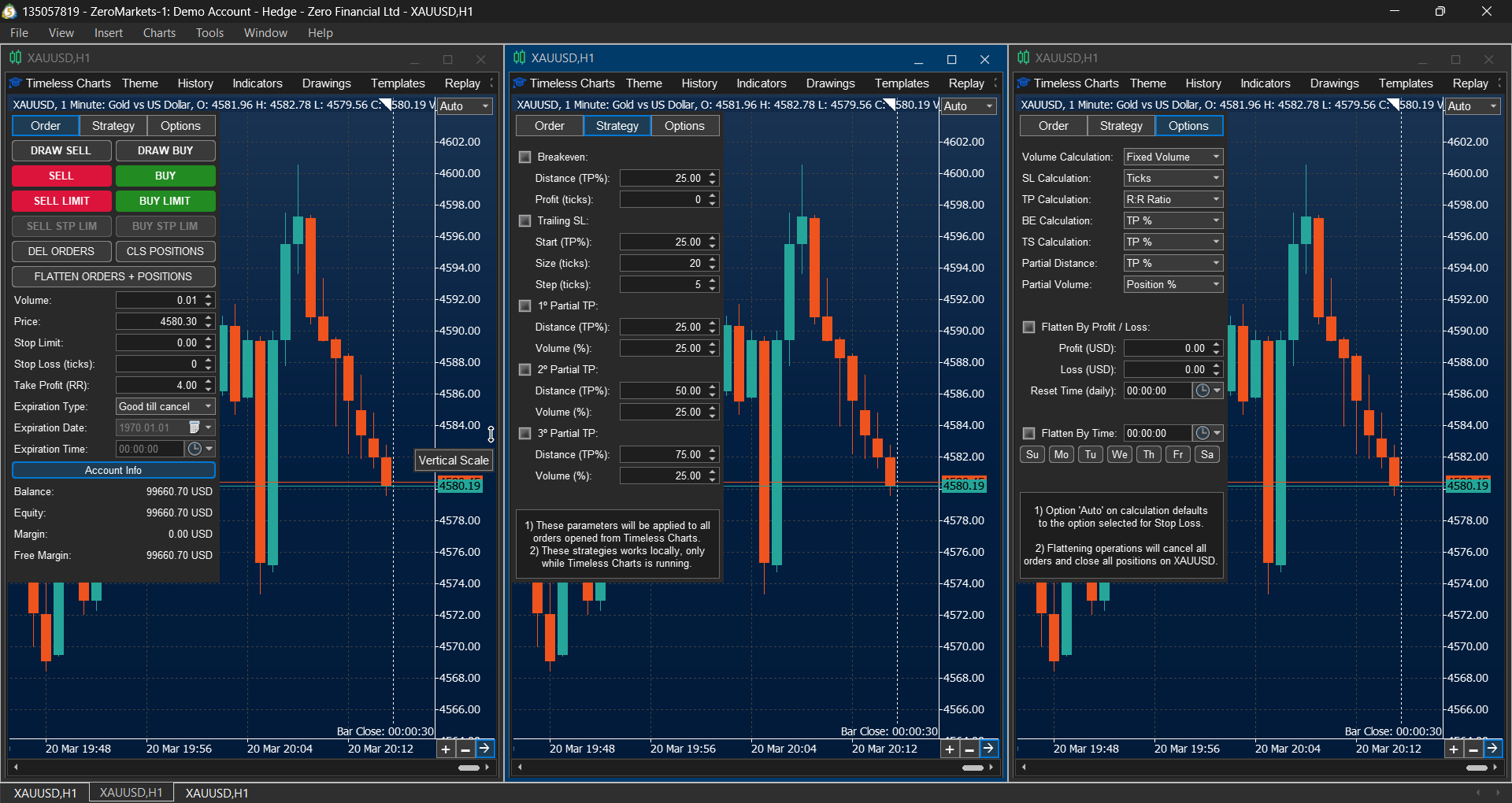
Set account-level conditions to automatically flatten your exposure when a profit target is reached, a loss limit is hit, or a scheduled time arrives. Configure these rules in the trade panel's Options tab to help enforce your trading limits without manually closing each position.
Flatten exposure when the configured profit threshold is reached.
Close exposure when the configured loss limit is reached.
Set a day and time to flatten exposure at the end of a trading session.
Experience custom charts, order flow, and integrated trading tools with Timeless Charts.
Replay rebuilds a past session from historical tick data and plays it forward on the chart you actually use — your templates, your drawings, your indicators, your footprint settings — with play, pause, speed and skip controls. You place and manage simulated trades as the session unfolds.
No orders reach your broker. Nothing about the practice environment differs from the live one, which is the point: rehearsing a setup in a simplified interface does not prepare you for the interface you will trade.
Where replay rewinds the past, a Virtual Account runs the present. It follows the live market on a separate simulated account, so you can trade a session in real time without capital at risk.
Rebuild timing on a live tape before real size goes back on it.
Learn how a symbol moves, and how its spread behaves, before you trade it.
Run the change live and compare its report against the one you replaced.
Orders are managed exactly as in a live account, with the same panel, the same drawings and the same risk rules — and no orders are sent to your broker.
The loop closes in the report. Real accounts, demo accounts, Virtual Accounts and Market Replay sessions all produce the same statistics, so practice results are directly comparable to live ones instead of living in a separate journal that cannot be reconciled against either.
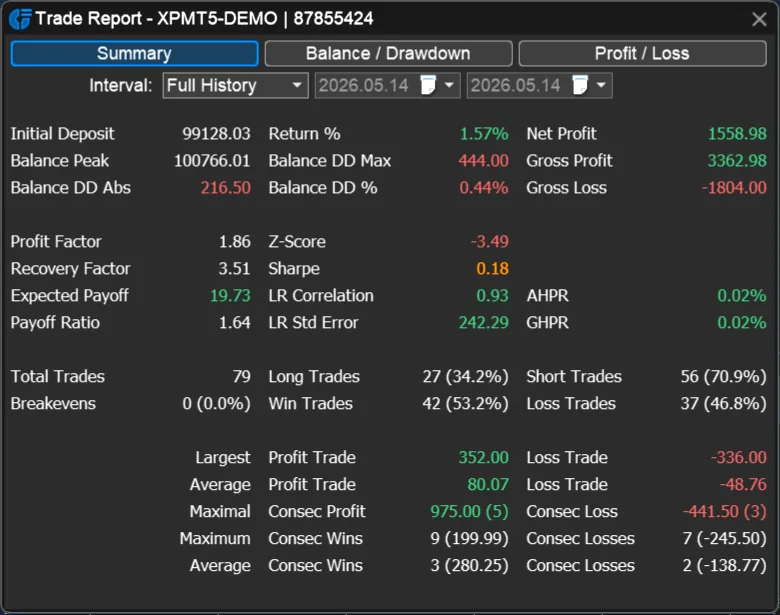
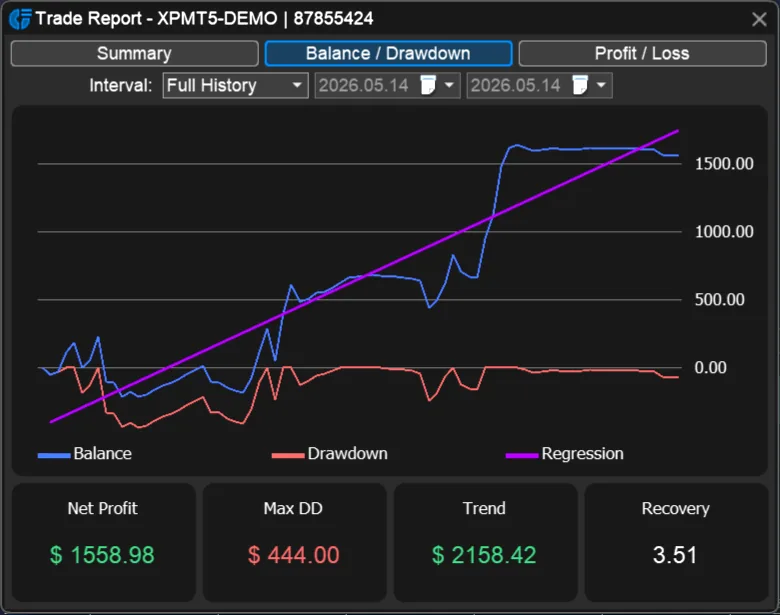
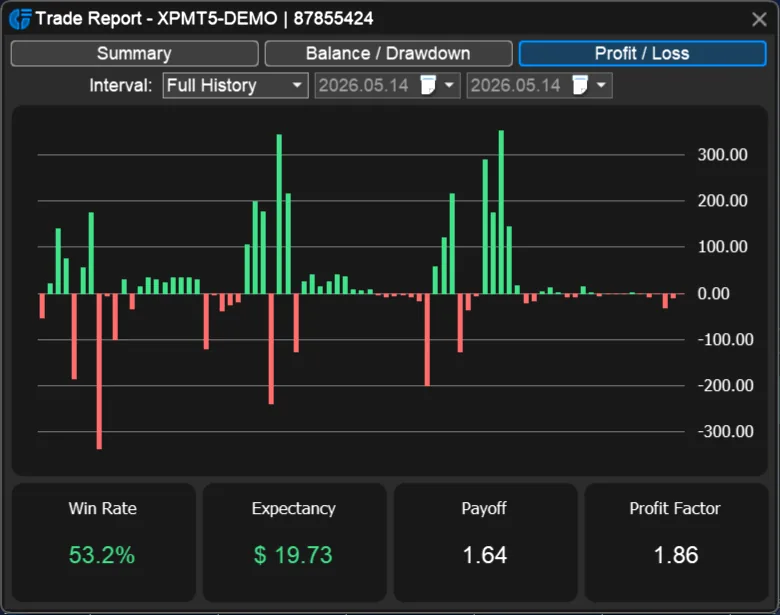
Explore chart trading, Market Replay, live simulation, and performance reporting in Timeless Charts for MetaTrader 5.
The trade panel, replay and reports are only useful because the same bars and the same studies carry through all of them.
Questions about licensing, supported accounts and what the Strategy Tester cannot do are answered in the FAQ.
Explore practical guides to chart types, order flow and market structure in our educational article library. Start with Price Charts Evolution to see how timeless bars support a complete workflow.